Rated 4.8 on Trustpilot
Read Reviews
·
Faults & Servicing
Monitoring Your Solar Panels Through an App
What a solar monitoring app shows you, how it works, the common glitches that are not faults, and the warning signs worth acting on.
By
Solar Panels London
·
Last reviewed
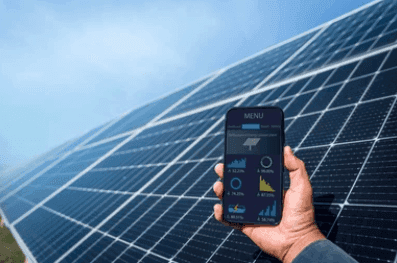
Almost every modern solar inverter comes with a free monitoring app or web portal from its manufacturer. It shows what your panels are generating now, what your home is using, what is going into or out of the battery, and what is being exported. Used well, it is the quickest way to spot a fault and the best way to understand your own system.

What you can see in a monitoring app
Live generation from your panels.
Household consumption, if a consumption sensor (usually a CT clamp on the incoming supply) is fitted.
Battery state of charge and when it is charging or discharging.
Import and export to and from the grid.
History by day, month and year, so you can compare this year with last.
Alerts and fault codes, often sent by email or app notification.
Many apps also let you control the battery: when it charges from the grid, how much it keeps in reserve, and when it discharges. That control is what lets you make the most of a time-of-use tariff. See our guide to Octopus Flux for an example.
How monitoring works
The inverter is the hub. It measures what the panels and battery are doing and sends the data over the internet, usually through a small Wi-Fi or Ethernet adapter (often called a dongle or data logger) plugged into the inverter. The manufacturer's cloud service stores it and the app displays it.

Two things often go wrong, and neither means the solar has stopped working:
The app shows nothing or "offline". Usually the Wi-Fi adapter has lost the connection, often after a new router or a changed Wi-Fi password. The panels are normally still generating; the data just is not reaching the app.
Consumption figures look wrong. This usually points to the consumption sensor, which may be fitted the wrong way round or have come loose. That is a job for your installer, not something to open up yourself.
What to look out for
Zero generation on a bright day. Check whether the inverter itself is showing a fault, then see what to check when solar panels are not generating.
Output well down on the same month last year, with no obvious reason such as a dull month or new shading.
A battery that never fills or never discharges. See why is my solar battery not charging.
Repeated fault codes or the inverter switching off on sunny days. See signs your solar inverter is failing.
Never open the inverter, the battery or any isolator to investigate. If the app points to a fault you cannot explain, it needs a qualified engineer.
Which monitoring is best?
For most homes, the best monitoring is the manufacturer's own app for the inverter you have, because it reads the equipment directly. Some people add a separate energy monitor or link the data to a home automation system, which some manufacturers support. If you are choosing a new system, it is worth looking at the app as part of the decision: you will use it far more often than you will look at the inverter.
If your monitoring has gone quiet or is showing faults, book a solar system inspection and we will find out why.
Latest Articles



Ready to Start Saving with Solar?
Get your free no-obligation quote today. Our experts will design the perfect system for your home.
Free Home Survey
MCS Certified
Finance Available


Quick Links
Services
Contact
© 2026 Solar Panels London. All rights reserved.